> ## Documentation Index
> Fetch the complete documentation index at: https://docs.limitless.exchange/llms.txt
> Use this file to discover all available pages before exploring further.
# Limit Orders
> Set your own price and earn LP rewards
## Overview
Limit orders let you set a specific price at which you're willing to trade. This gives you more flexibility and control over your orders.
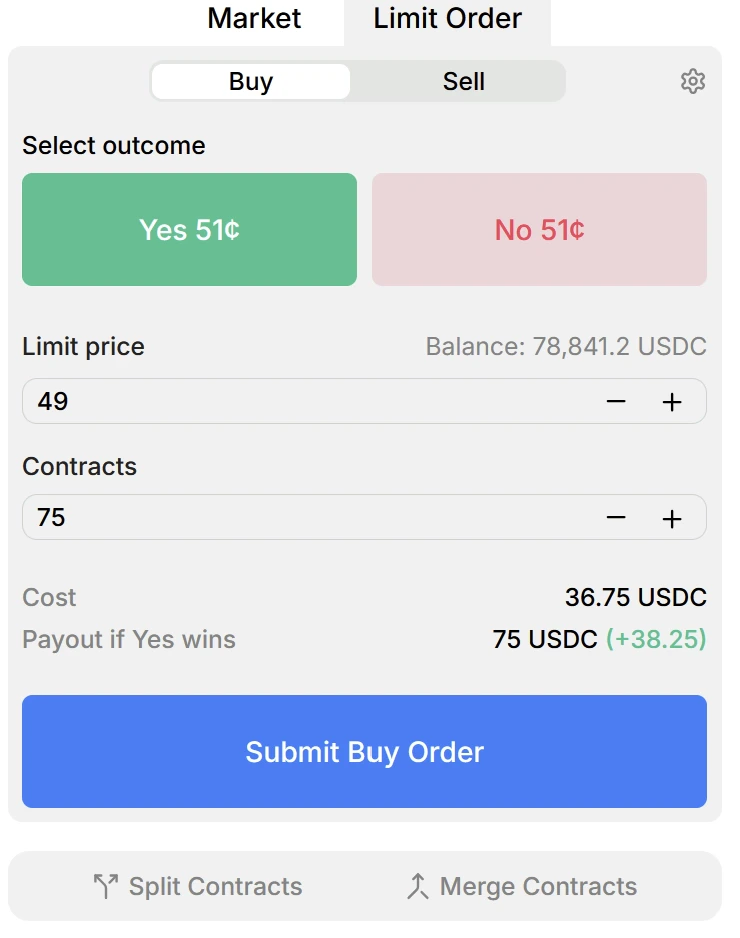 ## How to Place a Limit Order
1. Decide whether you're **buying** (bid) or **selling** (ask)
2. Specify your desired **price**
3. Enter the **number of shares**
4. Submit — the system adds your order to the order book, visible to other traders
Orders closer to the current market price have a **higher chance of being filled**.
## Benefits
* **Price control** — Trade at the exact price you want
* **Spread management** — Help narrow the bid-ask spread
* **LP rewards** — Earn rewards through the [LP Rewards program](/user-guide/lp-rewards) for providing liquidity
Engaging with limit orders strategically can earn you rewards as part of the LP Rewards program, incentivizing tighter spreads and greater market depth.
## How to Place a Limit Order
1. Decide whether you're **buying** (bid) or **selling** (ask)
2. Specify your desired **price**
3. Enter the **number of shares**
4. Submit — the system adds your order to the order book, visible to other traders
Orders closer to the current market price have a **higher chance of being filled**.
## Benefits
* **Price control** — Trade at the exact price you want
* **Spread management** — Help narrow the bid-ask spread
* **LP rewards** — Earn rewards through the [LP Rewards program](/user-guide/lp-rewards) for providing liquidity
Engaging with limit orders strategically can earn you rewards as part of the LP Rewards program, incentivizing tighter spreads and greater market depth.